Chores kids want to do.
Every kid gets a sheep that grows wool as they level up. Every chore pays what you decide — wool, real money, both, or nothing at all for the things everyone does anyway. One calendar shows the whole flock. Free to start; one purchase unlocks the whole flock, for good.
For iPhone and iPad on iOS 26 and iPadOS 26. Tap a sheep below — they hop.
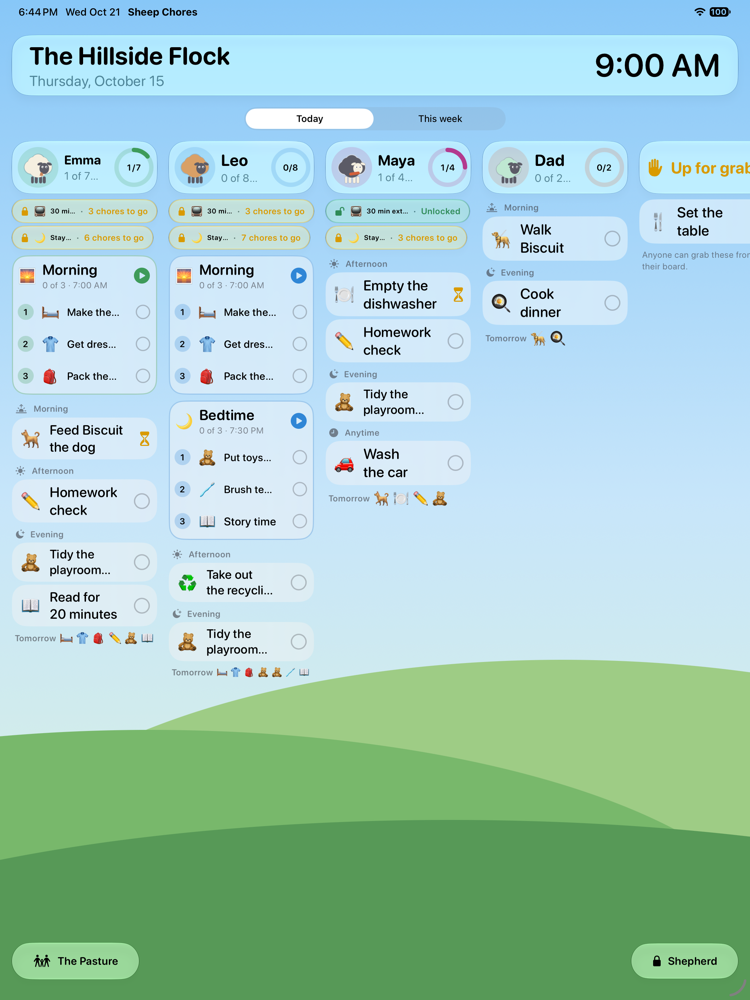
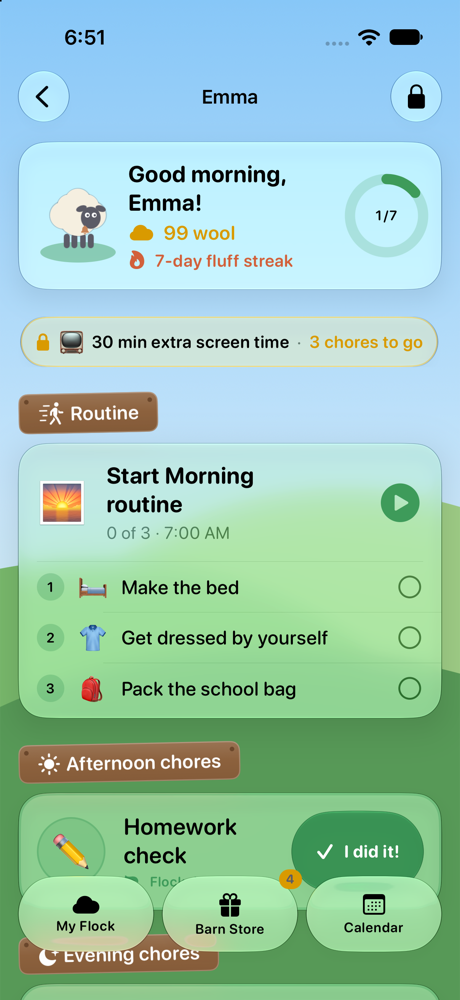
Sheep Chores turns the family chore chart into something kids reach for, and takes the nagging out of the parent's day. Here is the whole loop, start to finish.
You set it up once
Pick chores from a library of about 300, filed by room, or write your own. Decide what each one pays, who checks it, how it repeats and who does it. The editor even suggests what families typically pay for a kid's age.
The kid sees it on their board
Big cards, their own colour, read-aloud for pre-readers, a timer for timed goals that says how long is left. Routines play step by step so a six-year-old can run the morning without you.
“I did it!”
One tap, a hop from their sheep, confetti. A chore can need a photo of the finished job, or count on its own for kids you trust.
You approve from your iPhone
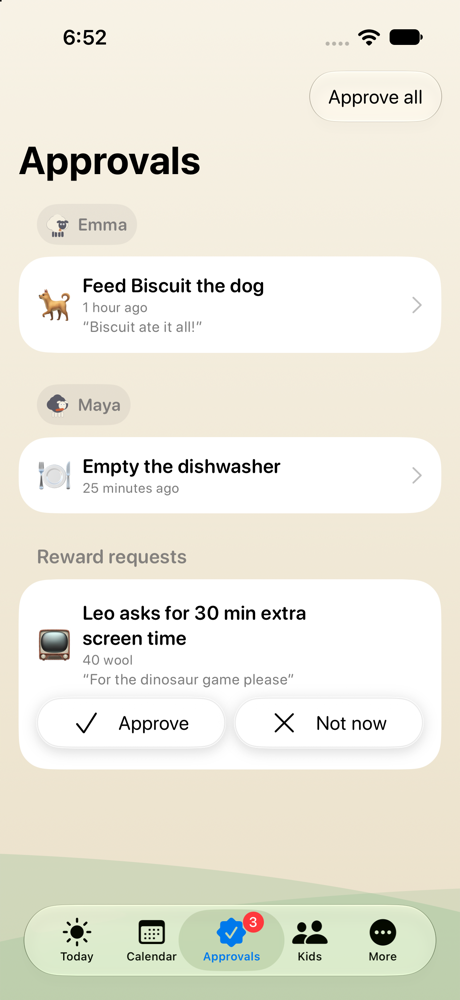
A banner arrives on your phone — Approve or Needs redo right there, or add a surprise bonus. Wool or money lands in the kid's ledger. Shear Day pays it out.
Try the button
This is the card a kid sees. The real one hops the sheep, stamps the card and tucks the chore away on a Done shelf, where Oops — not done yet brings it back. A mistaken tap is never final.
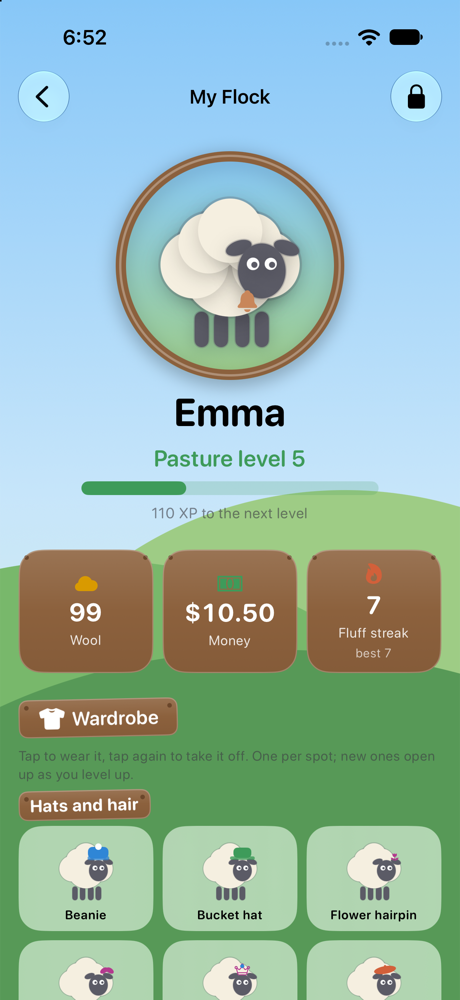
A sheep of their own
Every kid picks a wool colour and a favourite colour that marks their chores everywhere. Finished chores earn experience, experience raises the pasture level, and levels unlock a wardrobe of more than a hundred and thirty things to wear — crowns, sunglasses, capes, wings, a space helmet, a duckling that follows them about. None of it costs you a cent.
- Levels and wool that grow with every job, and a Fluff streak for keeping it up.
- Seventeen badges for real milestones: first chore, a week of wool, a photo proof, an early bird.
- The Pasture, a living meadow where the sky follows the clock from dawn to starry night, the seasons change, the windmill turns — on the iPad a chicken wanders out of the barn to do something silly anywhere on the meadow, every now and then a cow leans into a corner to see what the flock is up to, and with one switch the whole place dresses up for Halloween, Thanksgiving, Christmas and Easter.
- A picture board with big photos and almost no words for kids who are not reading yet.
Not every chore is a daily chore, and not every chore is for everyone. Sheep Chores keeps up.
Any schedule
Every day, weekdays, weekends, specific days, every few days, every other week, monthly on a day — with a start and an optional end, a time of day and a due time.
A library of ~300 chores
Filed by room — bedroom, bathroom, kitchen, laundry, pets, yard, school, self care, holidays, big jobs, habits — and searchable. Type dish or hoover and the matches appear.
Flock duties and jobs
Expected chores stay unpaid; paid chores are the extras. Both count toward levels and the streak, so “helping the flock” is its own reward.
Photo proof, or trust
A chore can be auto-approved, checked by a parent, or need a photo of the finished job. Older kids can earn a trust level and count their own, with a weekly spot-check.
Timed goals
Reading, instrument practice, time outside: a chore with minutes on the clock that the kid times from their own sheet. The clock keeps counting if they wander off, and it speaks — the chore and its minutes at the start, then halfway, five minutes, one minute, thirty seconds and time's up — from the iPad or a HomePod. With two kids on the clock, an Also running row switches between their timers in one tap.
Pay hints
The editor says what families typically pay for a kid's age and the chore's effort, and the allowance rule of thumb — a dollar per year of age — with a Use button.
Swipe for more →
Takes turns. Up for grabs. Together.
“It's not my turn” ends here. One chore can rotate between kids in an order you set, so the dishwasher is Emma's on Monday and Leo's on Tuesday without anyone keeping score. Or leave it up for grabs: the first kid to claim it gets the wool. Or make it a team chore — it sits on every board, one “We did it!” finishes it for everyone, and each kid earns the reward.
- Rotation follows the kids you list, in order, and skips a kid you archive.
- A fairness report shows who was assigned what and who actually did it.
- Grown-ups can be on the board too — without wool or money — so the kids see everyone pitching in.
Routines a kid can run alone
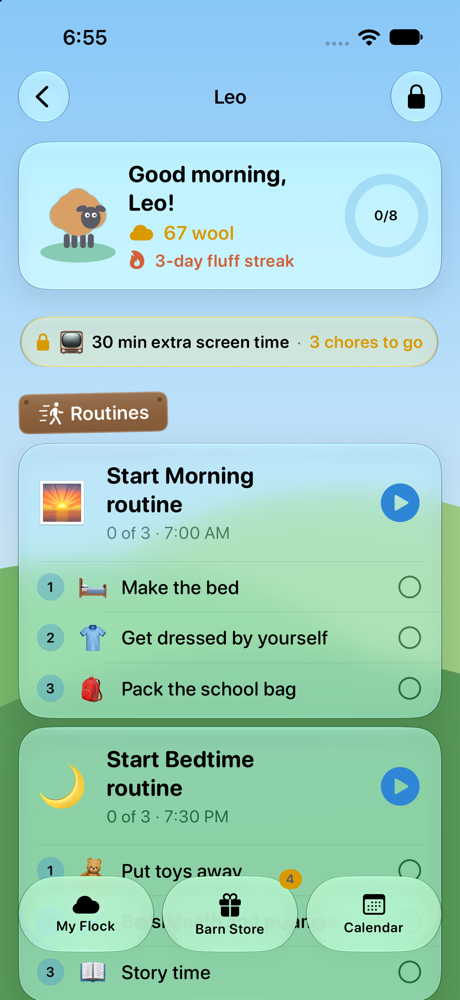
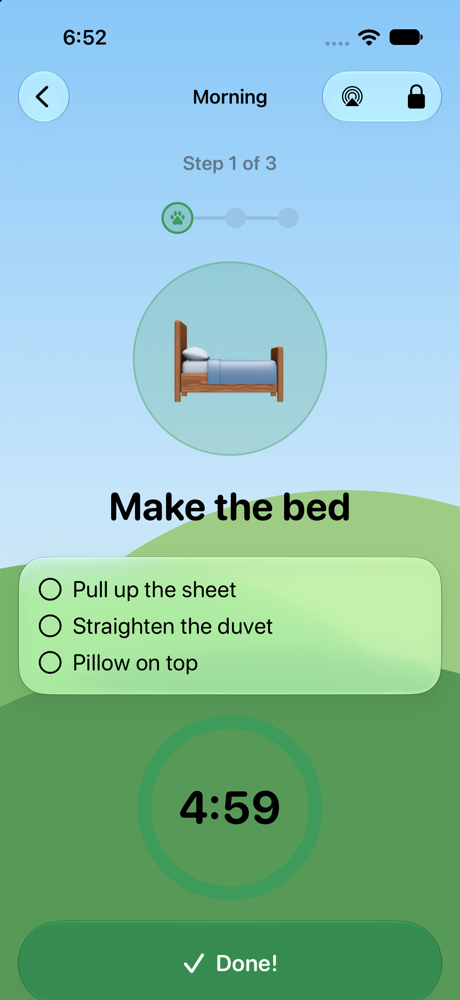
A routine plays a few chores in order with a countdown ring for each step: make the bed, get dressed, pack the bag. The player speaks each step and the time, then halfway, one minute, thirty seconds and time's up. Send the voice to a HomePod mini in the kids' room, ask Siri how much time is left, and watch the step tick on the Lock Screen as a Live Activity.
- Read-aloud for pre-readers; every step shows its chore big with its own checklist. A finished routine folds to one line with a check.
- Past zero the ring keeps counting, and Done records how long the step really took.
- Duplicate a routine for another kid at a different time in one tap.
The Barn Store
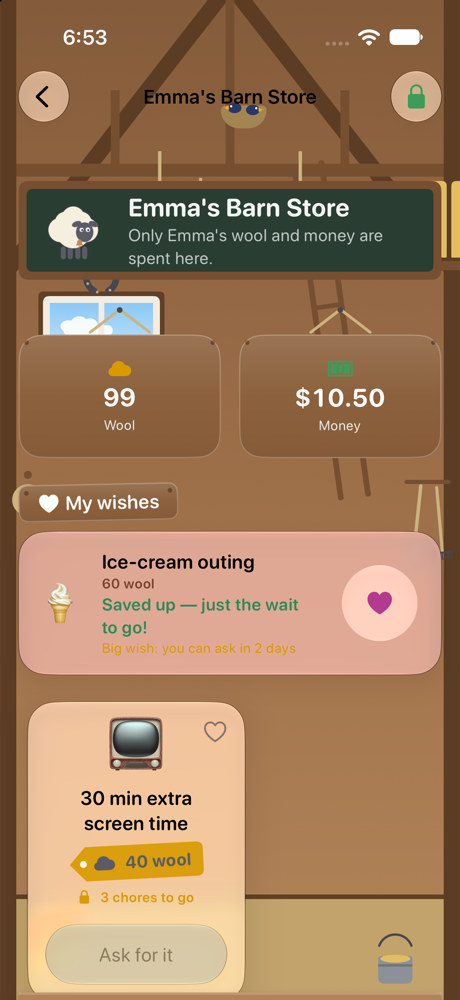
Thirty minutes of extra screen time for 40 wool. Pick Friday's movie for 25. A friend sleepover for fifteen dollars. Kids ask, you approve, and a redeemed-rewards inventory remembers what they have earned.
- Unlock gates: a privilege stays locked until the morning routine is approved, everything due before a time is done, or the whole board is done. Kids see the lock and how many chores are left.
- The wish list: tap the heart on a reward and the store says about how many weeks away it is at that kid's pace. A house rule can make big wishes wait a few days — a cooling-off period for impulse buys.
- Surprise bonuses from a parent, because unexpected rewards beat expected ones.
Every cent is a ledger line
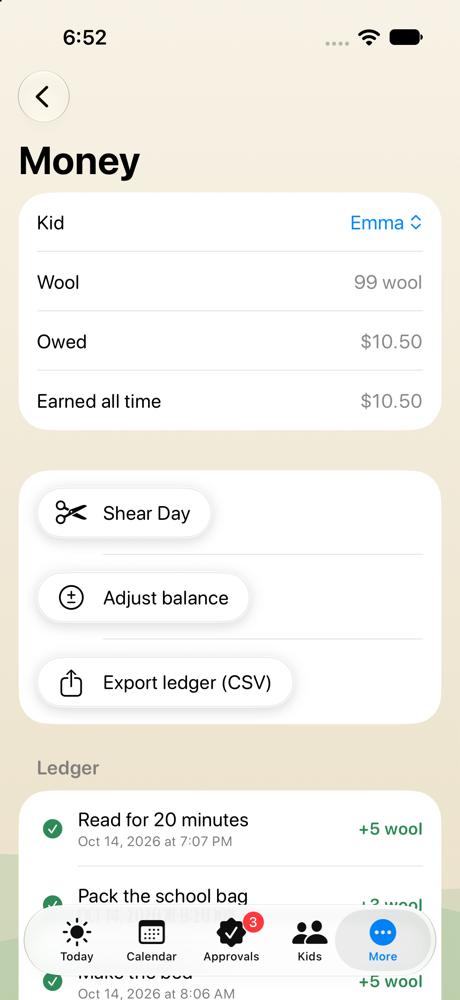
A chore can pay real money, weekly allowance arrives on the day you choose, and a balance is always the sum of what was earned, paid and spent. On Shear Day you pay out — cash, Apple Cash or a transfer, the app records which — and the kid starts the next week fresh.
- Savings goals and jars set money aside for something bigger, apart from what they can spend; pay a little jar interest if you like.
- Optional penalties for missed chores, off by default, waived with a tap when there was a good reason.
- Reports draw a twelve-week trend; the ledger and history export as CSV.
Everyone's week, side by side
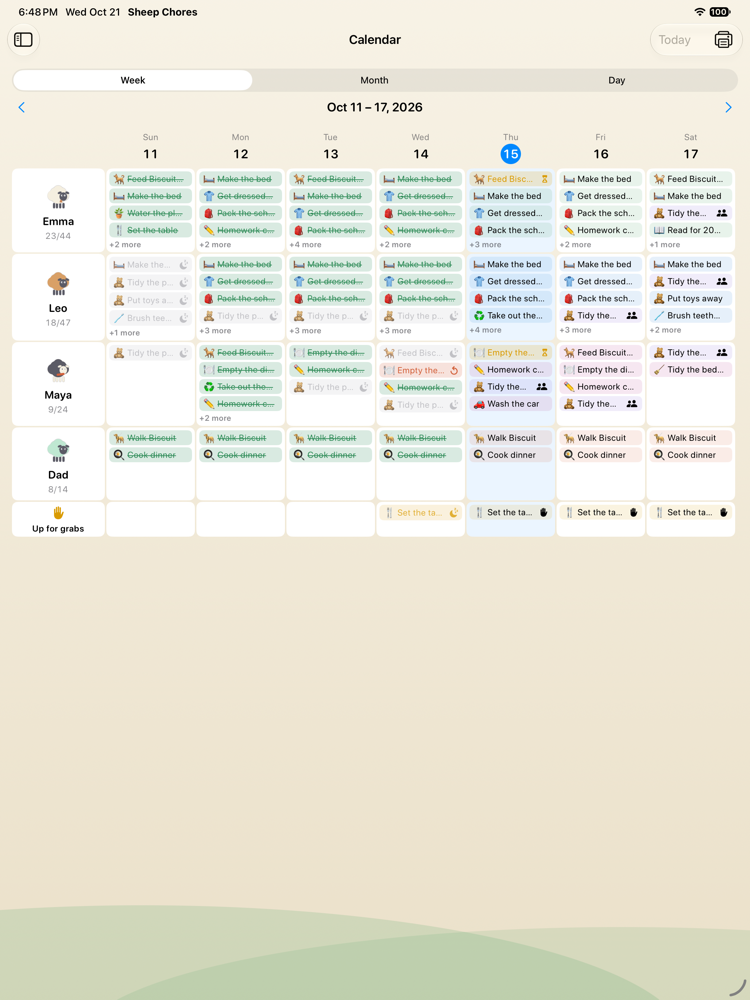
The week grid puts kids down the side and days across the top, so a glance shows who has what. Month view shows a dot per kid per day; day view lists everything in full. Print the week as a one-page sheet for the real fridge, and the kids get the same calendar, read-only, on their side.
- Week: every kid a row, every day a column, every chore a chip in that kid's colour.
- Month: a dot per kid per day, so a heavy Saturday shows from a distance.
- Day: everything in full, with a tap to add a chore for that day.
A fridge chart that answers back
Turn the kitchen iPad into an always-on chart of everyone's day: routines as routine cards with their steps, chores as chores, a ring per kid, and the week a tap away. A kid taps their chore right on the chart to finish it, or taps a routine to play it. A Shepherd standing by can check a finished chore with the PIN — or put a mistaken tap back to to-do.
At night it dims to a clock and turns the screen's brightness down. In the morning the sky comes back.
The parent side lives behind a PIN (Face ID on your own iPhone). It is built to shrink your workload, not add a screen to it.
Answer from the banner
Your iPhone tells you when a kid finishes a chore or asks for a reward on another device. Approve, send it back for another go, or open it — without unlocking the app.
One inbox
Finished chores grouped by kid with the photo, the note and how long it took. Approve all with one tap on a good day; take an approval back later if you need to.
Trust levels
Older kids can count their own chores; you review a sample each week instead of approving everything. The spot-check count only counts chores that needed a check.
Evening summary, weekly digest
Two optional notifications: how the day went, and how the week went — completion per kid, wool earned, streaks, money owed before Shear Day.
Two parents, two Apple IDs
Invite the other parent from Settings. They get the whole Shepherd side and the notifications on their own phone, and you both change the same flock.
Easy to undo
Put a chore or a whole routine back to to-do from the kid's screen with your PIN. Reset a ledger or a sheep from the kid's page. Nothing is ever one tap from disaster.
Swipe for more →
Each device signed into the family's iCloud account joins the flock on its own. Its role decides what it shows.
The family iPad
Starts in Kid Mode with every kid's sheep on the Pasture, or as the fridge chart. The Shepherd button and the PIN lead to the parent area.
Your iPhone
Starts on the parent side with Face ID. Gets the banners. Hand it to a kid for their board when you are out.
A kid's iPhone
Locked to one profile: their board, their store, their flock, their reminders — and nothing else.
HomePod mini & AirPlay
The routine player speaks each step and the time left. Tap AirPlay and the voice comes from a HomePod mini or any speaker in the kids' room, while the iPad stays in the kitchen.
Widgets & Live Activities
Today's board on the Home Screen, one kid's ring on the Lock Screen, the inbox count for a parent, and a routine in progress as a Live Activity on the Lock Screen and in the Dynamic Island.
Siri & Shortcuts
“What's on today?”, “What's waiting for me?”, “How much time is left?”, finish a chore, approve everything, give a bonus, start a routine, open a kid's board — and “Is the board done?” so a Shortcuts automation can ask before the TV turns on.
Apple Intelligence
Five chore ideas for a seven-year-old, made on the device. Image Playground portraits of each kid's sheep. Both only where available, never required.
Apple Cash, Numbers, the printer
Shear Day records whether you paid in cash, Apple Cash or a transfer. The ledger and history export as CSV for Numbers or Excel, and the week prints as a one-page sheet.
Swipe for more →
The same flock, a different app for each age. Set a birthday and the starter library, pay hints and the board adjust.
Pictures, not words
The picture board with real photos as chore icons, read-aloud on every card, routines with a ring, a sheep that hops when they tap it.
Their first wool
Big cards, “I did it!”, a Fluff streak to protect, the Barn Store to save for, and a morning routine they run themselves.
Money that means something
Jobs that pay, allowance on a weekday, savings jars with interest, a wish list that says how many weeks away a reward is.
Trusted, not supervised
Trust levels let them count their own chores with a weekly spot-check, team chores with younger siblings, Shortcuts for the ones who automate everything.
Swipe for more →
A chore app only works if the youngest and the most easily distracted can run it alone. These are built in, not bolted on.
Read aloud and spoken routines
Any card reads itself out loud for a pre-reader (a grown-up can give every kid the speaker button under Settings › The voice), and the routine player and timed chores speak each step, the halfway mark, five minutes on a long one, one minute, thirty seconds and time's up — saying whose minute it is when two clocks are going.
VoiceOver on everything
Every card, button, chart and chip has a label that says what it is and what state it is in; the time taken is read in whole words, not “4:12.”
Dynamic Type
Text follows the system size, up to the accessibility sizes, and the layouts stack instead of clipping.
Reduce Motion, respected
With Reduce Motion on, the confetti becomes a still card, the sheep stand still, the windmill stops and the chicken and cow stay home.
Big targets, clear words
Every button a kid taps is at least 60 points, status is never shown by colour alone, and the farm vocabulary can be switched to plain words in Settings.
A chime, if you like
An optional three-note chime plays when a chore is finished. It is off by default and respects the silent switch.
Swipe for more →
No subscription. No per-kid pricing. No “Pro”.
The biggest complaint about chore apps is the bill: a monthly fee that outlives the habit, savings goals behind a paywall, a price per kid. Sheep Chores is free to download with one kid and two chores, so you can try every screen. The whole flock — every kid, every chore, every feature, on every device in the family — is a single in-app purchase, shared through Family Sharing. The price is shown in the app and on the App Store.
FreeDownload it and try every screen
- One kid and two chores
- Every feature: routines, rewards, approvals, the calendar, the fridge chart, sync
- For as long as you like
OnceThe price is in the app and on the App Store
- As many kids and chores as you have
- Every device in the family, through Family Sharing
- No subscription, nothing to cancel, nothing deleted if you ever go back
| What families ask for | Sheep Chores | A typical subscription app |
|---|---|---|
| Unlimited kids and chores | One purchase, shared with the family | A monthly fee |
| Savings goals, routines, reports | Included | Usually “Premium” |
| Price | Free to start, then once | Monthly or yearly |
| Accounts and passwords | None — your iCloud | Required |
| Ads and analytics | None | Varies |
| Works offline | Yes, syncs later | Varies |
Sheep Chores has no server, no accounts and no analytics. Your family's chores, names, photos and money live on your devices and in your family's private iCloud, where Apple hosts them and we cannot read them. Here is exactly what that means.
No accounts, ever
Nothing to sign up for, no password to forget, no email list. Kids are profiles inside the app. The family's iCloud account is the only identity it uses, and the app never sees your Apple password.
Private iCloud, not our cloud
Everything syncs through CloudKit's private database under your Apple Account. We run no server and keep no copy. If we vanished tomorrow, the app and your data would carry on working.
No ads, no analytics, no SDKs
No advertising identifiers, no tracking across apps, no crash-reporting services, no third-party code at all. Apple's privacy label for the app reads “Data Not Collected.”
Photos stay home
A photo of a finished chore is kept in your iCloud with the rest, shrunk to a small image, and deleted with the completion. Photo proof is off by default and switched on per chore.
Intelligence on the device
Chore ideas and sheep portraits come from Apple Intelligence and Image Playground running on the device itself. The app sends no prompts anywhere, and both are optional extras that only appear where available.
Two parents, still private
Inviting the other parent uses CloudKit sharing: their own Apple Account gets access to the same private database, and nobody else does. Stop sharing from the same screen whenever you like.
A PIN between kids and grown-up things
Kids can finish chores, claim up-for-grabs jobs, ask for rewards and dress their sheep. Balances, chores, approvals and settings sit behind the parent PIN, and the family iPad never offers a way round it. Face ID on your own iPhone is handled by the device; the app only hears yes or no.
Yours to take or erase
Export the ledger and the completion history as CSV any time. Settings › Data › Erase removes everything from the device and from iCloud. Nothing is held hostage, and there is nothing to cancel.
Works offline
Every device keeps its own copy. Finish chores on a plane or in a dead spot; iCloud catches up later and folds any duplicates together.
Swipe for more →
Read the privacy policy — it is short because there is little to say. Questions go to [email protected].
The ones that come up before a family tries the app. The in-app Guide, under the Shepherd area, answers the rest.
Is Sheep Chores a subscription?
No. The download is free with one kid and two chores, so you can try every screen. One in-app purchase, “The Whole Flock”, unlocks unlimited kids and chores for good; it is shared with your Family Sharing group and covers iPhone and iPad.
Do my kids need their own accounts or Apple IDs?
No. Kids are profiles inside the app. The family iPad shows every kid; a kid's own iPhone can be locked to one profile. Everything syncs through the family's iCloud account — there are no accounts, passwords or sign-ups of ours.
Can both parents use it on their own phones?
Yes. Settings › Family sharing invites the other parent by link. They get the whole parent side and the notifications on their own iPhone, with their own Apple ID, and you both change the same flock.
How do I get notified when a kid finishes a chore?
Your iPhone gets a banner when a kid finishes a chore or asks for a reward on another device. Approve or send it back for another go straight from the banner, or open the inbox. An optional evening summary and a weekly digest round up the day and the week.
Can a chore pay real money instead of points?
Yes. Each chore pays wool points, money, both, or nothing at all for flock duties. A weekly allowance arrives on the day you choose. Every cent is a ledger line per kid, Shear Day pays the balance out, and the ledger exports as CSV.
How are chores shared fairly between siblings?
Three ways. Takes turns rotates a chore through the kids you list, in order. Up for grabs gives it to the first kid who claims it. Together makes one chore for a team: it sits on every board, one tap finishes it for everyone, and each kid earns the reward.
Does it work for kids who cannot read yet?
Yes. The picture board shows big pictures — real photos if you like — and almost no words, every card can be read aloud, and routines speak each step and the time left. Children from about three enjoy tapping their sheep.
What if a kid taps “I did it!” by mistake?
They tap Oops — not done yet on the Done shelf and the chore is back on the board. A parent can also put a chore or a whole routine back to to-do from the kid's screen with the PIN, and any approval can be taken back later.
Can I stop the tablet until the chores are done?
Unlock gates tie a reward in the Barn Store to the board: it stays locked until the morning routine is approved, everything due before a time is done, or the whole day is done. Kids see the lock and how many chores are left, and you get a banner when it opens. Sheep Chores does not take over the device's Screen Time controls; it makes the deal visible instead.
Does it work with a HomePod?
Yes. Open a routine, tap the AirPlay button and pick a HomePod mini or any AirPlay speaker: the spoken steps and the time left come from there, for routines and for timed chores, and the voice stays on that speaker while any clock runs. On the device that is playing, Siri answers “How much time is left in Sheep Chores?” Settings › The voice turns the spoken cues off.
Does it work offline?
Yes. Every device keeps its own copy and iCloud catches up when it is back online. If two devices change the same thing while apart, the app folds the duplicates together after the sync.
Which devices does it run on?
iPhone and iPad on iOS 26 and iPadOS 26 or later. It is one universal app, and the unlock is shared through Family Sharing. There is no Android version.
Can grown-ups be on the chart too?
Yes. Put yourself on the board without wool or money, so the kids see everyone pitching in. Grown-ups show on the calendar and the fridge chart and stay out of the money and reward lists.
Can I turn off the farm vocabulary?
Yes. Playful or plain words is a switch in Settings: Shepherd becomes Parent, wool becomes points, the Barn Store becomes Rewards. You can also call points stars or minutes.
How do I try it with data already in it?
Finish the setup wizard, open the parent area with your PIN, then Settings › Data › Add the sample family. The Hillside Flock — Emma, Leo, Maya and Dad — arrives with a week of history so every screen has something in it. Remove it the same way.
Give every kid a sheep.
Free to start. One purchase, the whole family, for good.